
It was a Tuesday evening.
Meera was walking into her job, carrying her laptop on her shoulder and a grocery bag in her other hand, and her cell phone was ringing.
Her daughter needed help with homework. Dinner wasn’t started. And somewhere in the chaos, she had completely forgotten to order the school craft supplies that were due tomorrow.
She sat down on the kitchen floor for a minute — not because she was tired (well, she was), but because she genuinely didn’t know what to tackle first.
Sound familiar?
If you’re a mom, you don’t just manage your own life, balancing college, work, and family responsibilities. You manage everyone else’s, too. The dentist appointments, the permission slips, the forgotten shoes, the school WhatsApp groups that never stop pinging. Your brain is always running — even at 2 AM.
That’s why finding the right time management apps for moms can make a huge difference in reducing daily stress and staying organized. Because when you have the right tool in your hands, it takes some of the mental load off your plate — and even a little relief can change your whole day.
Let me walk you through some of the best time management apps for moms that can make daily life easier in 2026.
Why Moms Need More Than a Paper Planner
I know — there’s something satisfying about writing in a planner. Crossing things off with a real pen. Sticking cute little stickers.
But here’s the reality.
When your child spills milk on your notebook, when you’re running between school pick-up and a Zoom call, when you need to share this week’s schedule with your mother-in-law who’s babysitting Thursday, a paper planner just can’t keep up.
Modern moms need tools that are:
- Synced across your phone, tablet, and laptop
- Easy to share with your partner, co-parent, or caregiver
- Simple enough to update in 30 seconds between tasks
- Flexible enough to handle last-minute changes (because they always happen)
That’s what good time management apps for moms are built to do. Let’s look at the best ones.
What to Look for Before Downloading Any App
Not every productivity app is designed with mom life in mind. Some are built for CEOs running corporate teams. Some are so complicated that they add stress instead of reducing it.
Here’s a quick checklist of what actually matters for moms:
| Feature | Why It Matters for Moms |
| Family sharing | Everyone stays on the same page |
| Color-coded calendars | Easy to scan on a rushed morning |
| Recurring task configuration | Automates the routines of your week |
| Push notifications and reminders | There is no way to erase anything |
| Grocery & to-do list integration | Five apps instead of one |
| Cross-platform sync | The laptop, tablet, and phone are updated. Laptops are kept up-to-date |
| Pricing that is affordable or free | Budget-conscious family households |
Keep this list in mind as we go through the apps. The best app isn’t the most feature-packed one — it’s the one that fits your life.
The Best Time Management Apps for Moms in 2026
1. Cozi Family Organizer — Best Overall for Busy Families
If I had to recommend just one app to a mom who’s never used a digital organizer before, it would be Cozi. No hesitation.
Meera started using Cozi when she realized she was managing three separate WhatsApp groups just to coordinate her kids’ schedules. It felt like a second job.
Cozi brought everything into one place — a shared family calendar, to-do lists, a shopping list, and a meal planner. Every family member has their own color. When Meera updates something, her husband (or co-parent, or mom, whoever’s helping) sees it instantly.
What Meera loves most:
She can add “buy bread” to the grocery list while lying in bed at 11 PM. No texting anyone. No sticky notes. It’s just there in the morning.
The recurring reminder feature also ensures that school events, bill payments, and medication schedules stay on autopilot. Creating routines is one of the easiest ways to reduce daily stress for mothers. She doesn’t have to remember to remember.
Best for: Moms with multiple kids, co-parenting arrangements, or anyone juggling caregivers and family schedules.
Price: Free (with ads) | Cozi Gold for premium features
2. Todoist — Best for the Mom Who Lives by Her To-Do List
Some moms are checklist people at heart. If your brain naturally thinks in tasks, subtasks, and priorities, Todoist will feel like it was built just for you.
It’s clean. It’s fast. And it’s surprisingly smart.
You can type “Pick up kids every weekday at 3 PM,” and Todoist automatically schedules it. No fiddling with settings. It also has a feature called “Karma” — a little progress tracker that gives you a visual sense of how productive your week has been. Honestly, sometimes that small visual reward is exactly what a tired mom needs.
What makes it great for moms:
It integrates with Google Calendar, Amazon Alexa, and even Slack — so it fits into the systems you already use. If you work from home or run a small business alongside parenting, this one handles both worlds really well. Many moms experience burnout when trying to manage work and family without a proper system.
Best for: Work-from-home moms, entrepreneurial moms, and anyone who loves a well-organized task list.
Price: Free | Pro plan from $4/month
3. Google Calendar — The Best Free Option (That You Probably Already Have)
Let’s talk about an app that’s already on most phones but is often underused.
Google Calendar is free, easy to use, and extremely powerful after you’ve set it correctly. You can make separate calendars, one for work, another for your child’s school schedule, and one for personal schedules. All are clearly color-coded and together in one glance.
The best part? It connects directly to Gmail. So when a confirmation email comes in for a doctor’s appointment or a school event, it automatically appears on your calendar. No manual entry needed.
Meera’s mother-in-law doesn’t use fancy apps, but she can access the shared family Google Calendar on her phone without any confusion. That alone saved Meera hundreds of “beta, what time should I come?” phone calls.
Best for: Moms on a tight budget, beginners, or anyone who just wants a reliable digital calendar without the learning curve.
Price: Completely free
4. Notion — Best for the Detail-Oriented, Creative Mom
Have you ever looked at a blank planner and thought, I wish I could design this exactly the way my brain works?
That’s Notion.
It’s not just a calendar or a task list. It’s more like a personal operating system. You can build your weekly routine template, track habits, plan meals, set family goals, write journal entries, and manage work projects — all in one beautifully organized space.
Meera’s friend Divya, who homeschools her two children AND runs an Etsy shop, swears by Notion. She built her entire family dashboard from scratch — and it looks like something out of a lifestyle magazine. But more importantly, it works for her brain.
The community templates mean you don’t have to build from zero. There are free templates made by other moms that you can simply duplicate and start using today.
Best for: Creative and organized moms, homeschooling moms, anyone who likes to customize their planning system.
Price: Free for personal use | Plus plan at $10/month
5. Any.do — Best for Quick, No-Fuss Daily Planning
Sometimes you don’t want to think too hard about your productivity system. You just want something that helps you get through the day.
Any.do is exactly that.
Every morning, it walks you through a two-minute “Daily Planner” — basically a gentle nudge to look at your day, decide what matters most, and organize it. No overwhelming setup. No complicated features. Just a calm, clear view of your day ahead.
The grocery list that comes with Any. You can also arrange your groceries by aisle. It might sound like a trivial issue, but the very first time Meera tried it out during an errand to the grocery store, she was able to finish shopping in just 20 minutes, not 45 minutes.
It also comes with WhatsApp integration, meaning it is possible to manage tasks using messages. It’s a game-changer for moms who have been immersed in WhatsApp throughout the day.
Best for: Moms who want something simple, fast, and stress-free for daily planning.
Price: Free | Premium at ~$5/month
Quick Comparison: Time Management Apps for Moms at a Glance
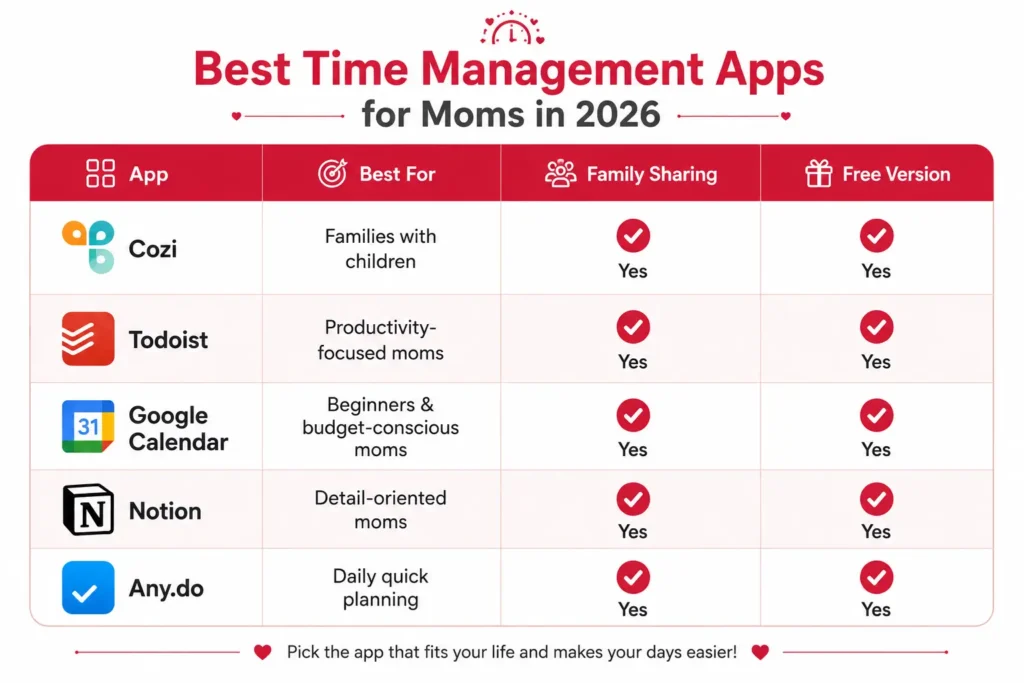
Each of these apps solves a different problem. Some focus on family scheduling, while others help with task management or daily planning. Choose the one that matches your routine instead of trying to use every app at once.
You May Also Like: Small Business Ideas for New Moms Who Want More Than Nap Time
How to Actually Stick With an App (This Is the Hard Part)
Downloading an app is the easy part. Using it consistently is where most moms give up after two weeks.
Here’s what actually works:
Start with just one habit.
Don’t try to move your entire life into a new app overnight. Start with your grocery list, or just your kids’ school schedule. Build from there slowly.
Do a five-minute morning check-in.
While you are sipping your coffee or your children are getting dressed, download your app to take a brief review of your day. A few minutes each morning could help you avoid confusion later.
Get the family involved.
Show your older kids or your partner how to add things to the shared list. An app is only as useful as the information in it — and you shouldn’t be the only one putting things in.
Set recurring tasks for your weekly routines.
Meal prep day, bill payment reminders, school activity dates — set them once and let the app remember for you. That’s the whole point.
And please, be patient with yourself.
Even with the best app in the world, some days will still be chaotic. That’s not the app failing. That’s just motherhood. The goal isn’t perfection — it’s less overwhelm.
The Real Reason This Matters
I want to say something here that goes beyond productivity tips.
When you’re constantly overwhelmed, forgetting things, and running on empty, you’re not fully there. Not for your kids, not for yourself.
Using the right time management apps for moms isn’t about being more efficient for efficiency’s sake. It’s about getting back those small pockets of calm. The ten minutes where you’re actually present during bath time. The evening when you’re not mentally running through tomorrow’s to-do list.
That’s what a good system gives you — not more hours, but better ones.
Final Words: Which App Should You Start With?
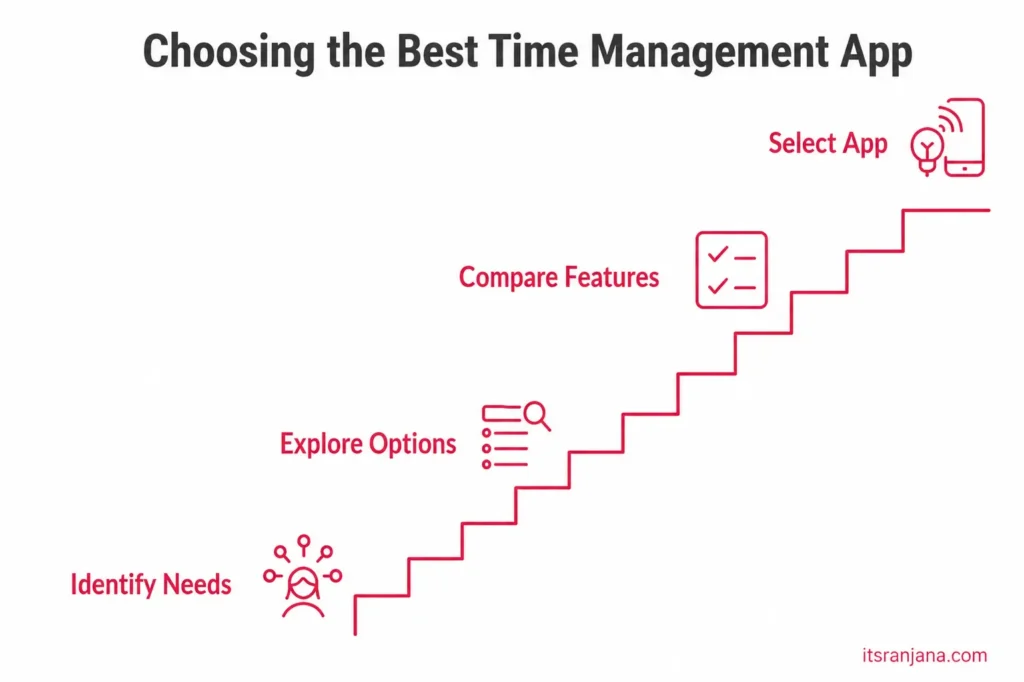
Here’s a simple guide based on your situation:
- Busy family with kids and a co-parent? → Start with Cozi
- Do you work from home or run a business? → Go with Todoist
- Looking for free and simple? → Google Calendar is all you need
- You love customizing and organizing everything? → Explore Notion
- Just want something quick with no learning curve? → Try Any.do
The best app is the one that actually fits into your life — not the one with the most features. Try one for two weeks. Be aware of how your mornings go. If it’s helpful, keep going. If it’s not working, try another. You deserve to live a life less like chaotic control and more like the one you have. The right tool is only a small step in this direction.
FAQs
What are the best time management apps for moms in 2026?
Some of the best time management apps for moms in 2026 include Cozi, Todoist, Google Calendar, Notion, Any.do, Trello, OurHome, TimeTree, Habitica, and Brain.fm. Each app serves a different purpose, from managing family schedules and daily tasks to improving focus and building productive habits.
Are time management apps for moms free?
Yes, most time management apps for moms offer a free version with essential features. Apps like Cozi, Google Calendar, OurHome, and TimeTree are completely free to use. Premium plans are available for advanced features and typically cost between $3 and $10 per month.
What is the best time management app for stay-at-home moms?
Cozi is one of the best time management apps for stay-at-home moms because it combines a family calendar, shopping lists, meal planning, and to-do lists in one place. It is simple to use, free, and specifically designed for family organization.
Can time management apps help reduce mom burnout?
Yes, time management apps can help reduce mom burnout by organizing schedules, setting reminders, managing tasks, and sharing responsibilities among family members. When your day is planned and organized, you can feel less overwhelmed and more in control.
Which time management app is best for moms who work from home?
Todoist and Notion are excellent choices for moms who work from home. Todoist helps manage both personal and professional tasks, while Notion provides an all-in-one workspace for planning, note-taking, and project management.
How do I choose the best time management app for my needs?
Start by identifying your biggest challenge—whether it’s family scheduling, task management, or staying focused. If you need family coordination, Cozi is a great choice. For task management, try Todoist. If you want an all-in-one workspace, choose Notion. Start with one app and build your routine around it.
Are time management apps for moms available on both iPhone and Android?
Yes, most popular time management apps for moms, including Cozi, Todoist, Google Calendar, Notion, Trello, and Any.do, are available on both iPhone (iOS) and Android devices. Many also offer desktop versions for added convenience.